7. ESM - Subscriber Testing
7.1 Prerequisites
Before running these tests, make sure you have:
- the Radius image (see RADIUS / AAA)
- the base PPPoE user
test@test.com
Then wait until ont2 completes the PPPoE login and validate on the BNGs:
show service active-subscribers
7.2 Validated Scenario: PPPoE Disable and Re-enable via Containerbot
In lab.yml, ONT2 is configured as PPPoE:
ont2:
  kind: linux
  image: ghcr.io/abelperezr/ont-ds:0.3
  env:
    CONNECTION_TYPE: pppoe
    WAN1_MODE: "ipv6"
    PPP_USER: "test@test.com"
    PPP_PASS: "testlab123"
    VLAN_ID: "150"
    IFPHY: "eth1"
    IFLAN: "eth2"
    MAC_ADDRESS: "00:D0:F6:01:01:04"
This procedure can be executed directly with the scripts located in small-isp-lab/configs/cbot/scripts (this requires Python and its dependencies to be installed):
python3 manage_authorize.py list
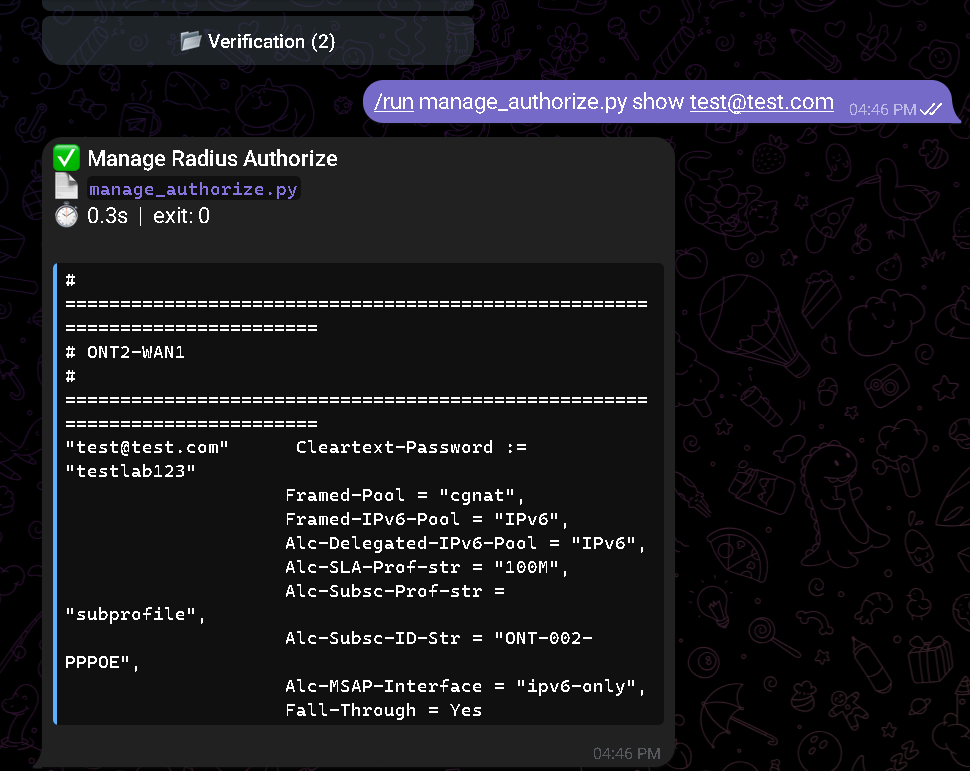
python3 manage_authorize.py show 'test@test.com'
abel@abel:~/small-isp-lab/configs/cbot/scripts$ python3 manage_authorize.py show 'test@test.com'
# ============================================================================
# ONT2-WAN1
# ============================================================================
"test@test.com"      Cleartext-Password := "testlab123"
                    Framed-Pool = "cgnat",
                    Framed-IPv6-Pool = "IPv6",
                    Alc-Delegated-IPv6-Pool = "IPv6",
                    Alc-SLA-Prof-str = "100M",
                    Alc-Subsc-Prof-str = "subprofile",
                    Alc-Subsc-ID-Str = "ONT-002-PPPOE",
                    Alc-MSAP-Interface = "ipv6-only",
                    Fall-Through = Yes
Alternative option: run it directly from containerbot:
docker exec -it containerbot python3 /app/scripts/manage_authorize.py list
docker exec -it containerbot python3 /app/scripts/manage_authorize.py show 'test@test.com'
Or from containerbot, if you followed the Telegram synchronization steps:
Validate the subscriber on the BNG:
A:admin@MASTER# show service active-subscribers

===============================================================================
Active Subscribers
===============================================================================
Subscriber ONT-002
           (subprofile)
...
2001:db8:100::2/128
              00:d0:f6:01:01:04  PPP 1              DHCP6        9998       Y
2001:db8:200:1::/64
              00:d0:f6:01:01:04  PPP 1              DHCP6-PD-MR  9998       Y
===============================================================================
The IPv4/IPv6 addresses and prefixes shown in this section are reference examples. Depending on the previous lab state, the host machine resources, and the reconnection sequence, they may vary between runs.
Validate addressing on ont2:
docker exec ont2 sh -lc 'ip ad show ppp0; echo ---; ip -6 route'
docker exec ont2 sh -lc 'ip ad show ppp0; echo ---; ip -6 route'
58: ppp0: <POINTOPOINT,MULTICAST,NOARP,UP,LOWER_UP> mtu 1492 qdisc fq_codel state UNKNOWN group default qlen 3
    link/ppp
    inet6 2001:db8:100::3/128 scope global
       valid_lft forever preferred_lft forever
    inet6 fe80::a877:b9ac:64af:934 peer fe80::7e20:64ff:fe84:8365/128 scope link nodad
       valid_lft forever preferred_lft forever
---
2001:db8:100::3 dev ppp0 proto kernel metric 256 pref medium
fe80::7e20:64ff:fe84:8365 dev ppp0 proto kernel metric 256 pref medium
fe80::a877:b9ac:64af:934 dev ppp0 proto kernel metric 256 pref medium
fe80::/64 dev eth1 proto kernel metric 256 pref medium
fe80::/64 dev eth1.150 proto kernel metric 256 pref medium
default dev ppp0 metric 1024 pref medium
The addressing shown above is an example. The WAN IPv6 and delegated prefix may change between test runs without implying an ATP failure.
Immediately disable the subscriber:
python3 manage_authorize.py deactivate 'test@test.com'
Alternative option: run it directly from containerbot:
docker exec -it containerbot python3 /app/scripts/manage_authorize.py deactivate 'test@test.com'
Or from containerbot:
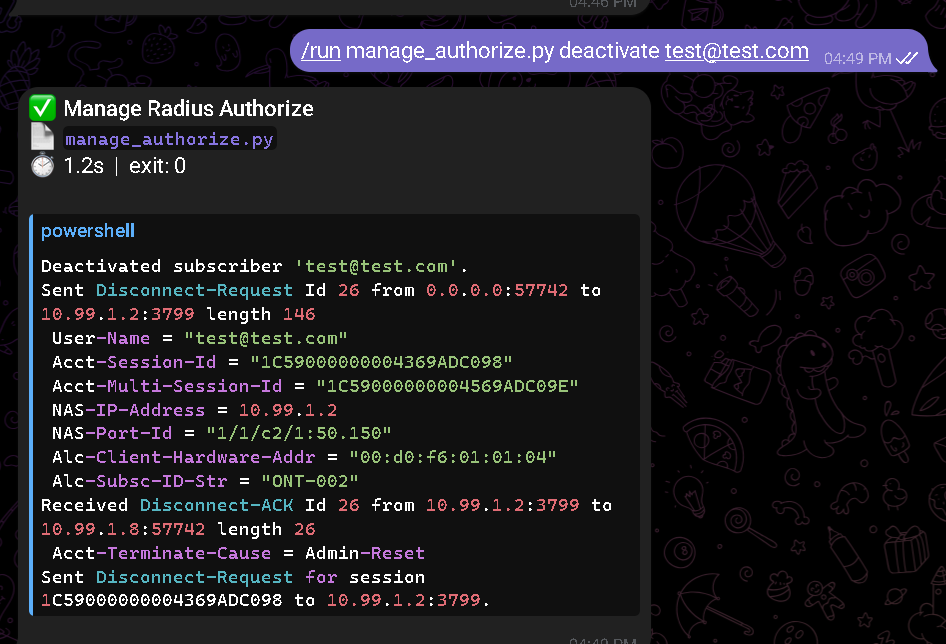
/run manage_authorize.py deactivate test@test.com
Note:
deactivateremoves the subscriber fromauthorize, reloads FreeRADIUS, and sends aDisconnect-Request- this is the closest match to the intended operational behavior
Validate the disable action on the BNG:
A:admin@MASTER# show service active-subscribers
Expected result:
ONT-002no longer appears- the bot previously receives
Disconnect-ACK
Validate the disable action on ont2:
docker exec ont2 sh -lc 'ip ad show ppp0; echo ---; tail -n 40 /var/log/ppp/pppd.log'
 docker exec ont2 sh -lc 'ip ad show ppp0; echo ---; tail -n 40 /var/log/ppp/pppd.log'
66: ppp0: <POINTOPOINT,MULTICAST,NOARP> mtu 1500 qdisc noop state DOWN group default qlen 3
    link/ppp
---
2026-03-08 21:50:37 [pppoe] Timeout waiting for ppp0
2026-03-08 21:50:37 [pppoe] PPPoE connection failed
2026-03-08 21:50:37 [pppoe] PPPoE connection failed
2026-03-08 21:50:37 [pppoe] Last lines from the pppd log:
sent [LCP TermAck id=0xb3]
Send PPPOE Discovery V1T1 PADR
Connect: ppp0
Re-add the subscriber:
python3 manage_authorize.py add 'test@test.com' \
  --title 'ONT2-WAN1' \
  --password 'testlab123' \
  --framed-pool 'cgnat' \
  --framed-ipv6-pool 'IPv6' \
  --delegated-ipv6-pool 'IPv6' \
  --subscriber-id 'ONT-002' \
  --subscriber-profile 'subprofile' \
  --msap-interface 'ipv6-only' \
  --sla-profile '100M'
Or with docker exec on containerbot:
docker exec containerbot sh -lc 'python3 /app/scripts/manage_authorize.py add "test@test.com" \
  --title "ONT2-WAN1" \
  --password "testlab123" \
  --framed-pool "cgnat" \
  --framed-ipv6-pool "IPv6" \
  --delegated-ipv6-pool "IPv6" \
  --subscriber-id "ONT-002" \
  --subscriber-profile "subprofile" \
  --msap-interface "ipv6-only" \
  --sla-profile "100M"'
Or from containerbot:
/run manage_authorize.py add test@test.com --title ONT2-WAN1 --password testlab123 --framed-pool cgnat --framed-ipv6-pool IPv6 --delegated-ipv6-pool IPv6 --subscriber-id ONT-002 --subscriber-profile subprofile --msap-interface ipv6-only --sla-profile 100M
Important:
--subscriber-profile 'subprofile'is required for the BNG to rebuild the subscriber correctly- as a convergence window, wait between 10 and 120 seconds before running the next step
- on hosts with more resources, recovery may happen much sooner, even within a few seconds
- Validate again on the BNG and ONT:
A:admin@MASTER# show service active-subscribers
docker exec ont2 sh -lc 'ip ad show ppp0; echo ---; ip -6 route'
Expected result:
ONT-002appears again on the BNGont2recovers2001:db8:100::2/128
The recovered IPv6 on ont2 is shown as an example. The exact value may vary between reconnections.
- Edit the
subscriber-id:
docker exec containerbot python3 /app/scripts/manage_authorize.py edit 'test@test.com' \
  --subscriber-id 'ONT-002-PPPOE'
- Verify the change in RADIUS:
docker exec radius cat /etc/raddb/mods-config/files/authorize
Expected result:
- the
test@test.comblock showsAlc-Subsc-ID-Str = "ONT-002-PPPOE"
7.2.1 Validated Scenario: IPoE Disconnect and Reconnect for ONT-001
This workflow was validated for the three IPoE WANs on ont1 using docker exec on containerbot, without requiring a manual clear service on the BNG.
Operational base:
WAN100:d0:f6:01:01:01ipv6-onlyWAN200:d0:f6:01:01:02dual-stackWAN300:d0:f6:01:01:03vip
Disconnect one IPoE WAN
Run one at a time.
Examples:
docker exec containerbot sh -lc 'python3 /app/scripts/manage_authorize.py --disconnect-debug deactivate 00:d0:f6:01:01:01'
docker exec containerbot sh -lc 'python3 /app/scripts/manage_authorize.py --disconnect-debug deactivate 00:d0:f6:01:01:02'
docker exec containerbot sh -lc 'python3 /app/scripts/manage_authorize.py --disconnect-debug deactivate 00:d0:f6:01:01:03'
Expected result:
containerbotshows theDisconnect-Request- the BNG replies with
Disconnect-ACK - only the selected WAN disappears from
show service active-subscribers - the other
ONT-001WANs remain active ONT-002is not affected
Quick validation on the BNG:
show service active-subscribers | match 00:d0:f6:01:01:01
show service active-subscribers | match 00:d0:f6:01:01:02
show service active-subscribers | match 00:d0:f6:01:01:03
show service active-subscribers | match 00:d0:f6:01:01:04
Re-add one IPoE WAN
Examples:
docker exec containerbot sh -lc 'python3 /app/scripts/manage_authorize.py add 00:d0:f6:01:01:01 \
  --title ONT1-WAN1-BNG1 \
  --password testlab123 \
  --framed-ipv6-pool IPv6 \
  --delegated-ipv6-pool IPv6 \
  --subscriber-id ONT-001 \
  --subscriber-profile subprofile \
  --msap-interface ipv6-only \
  --sla-profile 100M'

docker exec containerbot sh -lc 'python3 /app/scripts/manage_authorize.py add 00:d0:f6:01:01:02 \
  --title ONT1-WAN2-BNG1 \
  --password testlab123 \
  --framed-pool cgnat \
  --framed-ipv6-pool IPv6-dual-stack \
  --delegated-ipv6-pool IPv6-dual-stack \
  --subscriber-id ONT-001 \
  --subscriber-profile subprofile \
  --msap-interface dual-stack \
  --sla-profile 100M'

docker exec containerbot sh -lc 'python3 /app/scripts/manage_authorize.py add 00:d0:f6:01:01:03 \
  --title ONT1-WAN3-BNG1 \
  --password testlab123 \
  --framed-pool one-to-one \
  --subscriber-id ONT-001 \
  --subscriber-profile subprofile \
  --msap-interface vip \
  --sla-profile 100M'
Validation on ont1:
docker exec ont1 sh -lc 'curl -sS http://127.0.0.1:8080/api/status'
Expected result:
WAN1returns with WAN IPv6 and active PDWAN2returns with IPv4 + IPv6WAN3returns with IPv4- the WAN appears again in
show service active-subscribers
The ONT may recover the IP address first and only a few seconds later reappear on the BNG. In the validated tests, recovery happened without any manual clear and within a short convergence window.
7.3 Operational Notes
deleteonly removes future authorizationdeactivateis the recommended operation to simulate immediate suspension- after editing attributes on an already active session, you may need to force
disconnectso the new values apply on the next session - the lab uses a derived official FreeRADIUS image with
radclient, SSH, and accounting enabled for this workflow
7.4 Fallback to LUDB
LUDB fallback was verified for the three IPoE subscribers on ont1 by forcing renews from the CLI through the ONT API. The PPPoE case is not part of this test because the ONT2-PPPOE LUDB entry is still commented out in configs/sros/master.txt and configs/sros/slave.txt.
7.4.1 Stop RADIUS and clear state on the Master BNG
docker stop radius
clear service id "9998" ipoe session all
clear router "9998" dhcp6 local-dhcp-server "suscriptores_v6" leases all
Expected result:
- active IPoE sessions disappear temporarily
- DHCPv6 leases drop to zero
show aaa radius-server-policy "radius_policy"may show the server asprobingorout-of-servicedepending on the health-check timer
Observed example:
[/]
A:admin@MASTER# show router 9998 dhcp6 local-dhcp-server "suscriptores_v6" leases

===============================================================================
Leases for DHCPv6 server suscriptores_v6
===============================================================================
No leases found
===============================================================================
7.4.2 Force renews from the CLI on ont1
Instead of clicking the UI, call the same logic through the local ONT API.
From your laptop or from the host running Containerlab, use the published port 127.0.0.1:8090:
curl -sS -X POST http://127.0.0.1:8090/api/dhcp6/renew/1
curl -sS -X POST http://127.0.0.1:8090/api/dhcp/renew/2
curl -sS -X POST http://127.0.0.1:8090/api/dhcp6/renew/2
curl -sS -X POST http://127.0.0.1:8090/api/dhcp/renew/3
If you execute the curl commands inside the ont1 container, the service listens on 127.0.0.1:8080. The lab.yml publishes that port as 8090:8080 for host access.
Observed output:
{"success": true, "message": "DHCPv6 renewal initiated on eth1.150"}
{"success": true, "message": "DHCP renewal initiated on eth3.200"}
{"success": true, "message": "DHCPv6 renewal initiated on eth3.200"}
{"success": true, "message": "DHCP renewal initiated on eth4.300"}
After triggering the renews, wait between 10 and 30 seconds before validating session and lease reconstruction.
On hosts with more resources, recovery may happen much faster.
7.4.3 Validate that LUDB rebuilt the IPoE subscribers
Verify on the Master BNG:
show service id 9998 ipoe session
show router 9998 dhcp6 local-dhcp-server "suscriptores_v6" leases
show service active-subscribers
Observed result:
[/]
A:admin@MASTER# show service id 9998 ipoe session

===============================================================================
IPoE sessions for svc-id 9998
===============================================================================
[1/1/c2/1:50.150]                00:d0:f6:01:01:01
[1/1/c2/1:51.200]                00:d0:f6:01:01:02
[1/1/c2/1:52.300]                00:d0:f6:01:01:03
-------------------------------------------------------------------------------
Number of sessions : 3
===============================================================================
[/]
A:admin@MASTER# show router 9998 dhcp6 local-dhcp-server "suscriptores_v6" leases

===============================================================================
Leases for DHCPv6 server suscriptores_v6
===============================================================================
2001:db8:100::X/128
2001:db8:200::/64
2001:db8:cccc::1/128
2001:db8:dddd::/64
-------------------------------------------------------------------------------
4 leases found
===============================================================================
[/]
A:admin@MASTER# show service active-subscribers

===============================================================================
Active Subscribers
===============================================================================
00:d0:f6:01:01:01|1/1/c2/1:50.150
  2001:db8:100::X/128
  2001:db8:200::/64
00:d0:f6:01:01:02|1/1/c2/1:51.200
  100.80.0.4
  2001:db8:cccc::1/128
  2001:db8:dddd::/64
00:d0:f6:01:01:03|1/1/c2/1:52.300
  192.168.5.4
-------------------------------------------------------------------------------
Number of active subscribers : 3
===============================================================================
During LUDB fallback, the subscriber-id may appear in MAC|SAP format instead of ONT-001. This happens because the session comes in through a default LUDB user and the BNG rebuilds the operational identity from the MAC address and SAP.
7.4.4 Validate the final ONT state
From your laptop or from the host, query the published port 8090:
curl -sS http://127.0.0.1:8090/api/status
If you run the query inside the ont1 container, use http://127.0.0.1:8080/api/status.
Items to check:
WAN1recovers an address from the2001:db8:100::/56pool- the active PD returns as
2001:db8:200::/64 - the
eth2LAN advertises2001:db8:200::1/64 WAN2recovers100.80.0.4/29and2001:db8:cccc::1/128WAN3recovers192.168.5.4/29
The addresses shown in this validation are examples. After lease renewal or session rebuild, the exact values may change and still be valid.
7.4.5 Restore RADIUS
docker start radius
7.5 Verify subscriber policies and profiles
Verify the policies and profiles associated with subscriber management.
Related commands:
show subscriber-mgmt authentication "autpolicy"show subscriber-mgmt authentication "autpolicy" associationshow subscriber-mgmt radius-accounting-policy "accounting"show subscriber-mgmt radius-accounting-policy "accounting" associationshow subscriber-mgmt sub-profileshow subscriber-mgmt sla-profileshow subscriber-mgmt sub-ident-policy "subident"show subscriber-mgmt ipoe-session-policy "ipoe"show subscriber-mgmt ppp-policy "pppoe"
[gl:/configure]
A:admin@MASTER# show subscriber-mgmt authentication "autpolicy"

===============================================================================
Authentication Policy autpolicy
===============================================================================
Description          : (Not Specified)
Re-authentication    : Yes                 Username Format      : MAC Address
PPPoE Access Method  : PAP/CHAP            Username Mac-Format  : "aa:"
PPP-Username Oper    : None
PPP-Domain-Name      : N/A
Username Oper        : None
Domain-Name          : N/A
Acct-Stop-On-Fail    :
RADIUS Server Policy : "radius_policy"
Fallback Action      : user-db clientes
Force Probing        : false
Last Mgmt Change     : 03/08/2026 14:00:16
-------------------------------------------------------------------------------
Include Radius Attributes
-------------------------------------------------------------------------------
Remote Id            : Yes                 Circuit Id           : No
NAS Port Id          : Yes                 NAS Identifier       : Yes
PPPoE Service Name   : Yes                 DHCP Vendor Class Id : Yes
Access Loop Options  : Yes                 MAC Address          : Yes
NAS Port Prefix      : None                NAS Port Suffix      : None
NAS-Port-Type        : Yes (standard)      Acct Session Id      : Session
Calling Station Id   : Yes (sap-string)    Called Station Id    : Yes
Tunnel Server Attr   : Yes                 DHCP Options         : Yes
NAS Port             : No                  SAP Session Index    : No
Wifi SSID VLAN       : No
DHCP6 Options        : No
Num-Attached-UEs     : No
Xcon Tunnel Home Addr: No
===============================================================================
[gl:/configure]
A:admin@MASTER# show subscriber-mgmt authentication "autpolicy" association

===============================================================================
Authentication Policy autpolicy
===============================================================================
-------------------------------------------------------------------------------
SAP Associations
-------------------------------------------------------------------------------
Service-Id : 2 (VPLS)
 - SAP : 1/1/c2/1:50.*
 - SAP : 1/1/c2/1:51.*
 - SAP : 1/1/c2/1:52.*

-------------------------------------------------------------------------------
Interface Associations
-------------------------------------------------------------------------------
Service-Id : 9998 (VPRN)
 - If Name : dual-stack
 - If Name : ipv6-only
 - If Name : vip
[gl:/configure]
A:admin@MASTER# show subscriber-mgmt radius-accounting-policy "accounting"

===============================================================================
Radius Accounting Policy accounting
===============================================================================
Description          : (Not Specified)
Update Interval      : 720 min.              Mcs Interval       : 0 min.
Oper Interval Jitter : 10%                   Configured Jitter  : 10%
Host Accounting      : None                  Session-id Format  : Number
Queue Instance Acct  : None                  Session Acct       : Interim-Host
Acct-tunn-conn format: %n
Delay Start Time     : None
RADIUS Server Policy : "radius_policy"
Triggered Updates    : None
Last Mgmt Change     : 03/08/2026 14:00:16
-------------------------------------------------------------------------------
Include Radius Attributes
-------------------------------------------------------------------------------
Framed IP Address    : Yes                   Framed Ip Netmask  : Yes
Subscriber Id        : Yes                   Circuit Id         : Yes
Remote Id            : Yes                   NAS Port Id        : Yes
NAS Identifier       : Yes                   Sub-Profile        : Yes
SLA-Profile          : Yes                   User-Name          : Yes
SPI Sharing Id       : No
Calling Station Id   : No                    Called Station Id  : Yes
NAS Port Prefix      : None
NAS Port Suffix      : None
Tunnel Server Attr   : Yes                   Tunnel Client Attr : No
NAS-port             : No                    NAS-Port-Type      : Yes (standar*
NAT-Port-Range       : Yes                   MAC Address        : Yes
Acct-delay-time      : Yes                   Acc-authentic      : Yes
IPv6-Address         : Yes                   Framed-Interface-Id: No
Delegated-IPv6-Prefix: Yes                   Framed-IPv6-Prefix : Yes
Wi-fi SSID VLAN      : No
Wi-fi RSSI           : No                    Alc-Acct-Tr-Reason : Yes
DHCP Vendor Class Id : No
Framed IPv6 Route    : Yes                   Framed Route       : Yes
All-auth-session-addr: No                    Access-loop-options: No
Detailed-Acct-Attr   : Yes                   Std-Acct-Attr      : Yes
v6-aggregate-stats   : No                    Alc-Error-Code     : No
Num-Attached-UEs     : No                    Steering-Profile   : No
BRG-Num-Act-Sess     : No
Bonding-Id           : No                    Active-Connections : No
Firewall-Info        : No
Xcnt-Tunnel-Home-Addr: No
Bearer-Fteid         : No
User-Location-Info   : No
LAC fragmentation    : No
Rat-type             : No
===============================================================================
[gl:/configure]
A:admin@MASTER# show subscriber-mgmt radius-accounting-policy "accounting" association

===============================================================================
Radius Accounting Policy accounting
===============================================================================
-------------------------------------------------------------------------------
Sub-Profile Associations
-------------------------------------------------------------------------------
subprofile
-------------------------------------------------------------------------------
Number of Subscriber Profiles : 1
===============================================================================
[gl:/configure]
A:admin@MASTER# show subscriber-mgmt sub-profile

===============================================================================
Subscriber Profiles
===============================================================================
Subscriber                       Description
-------------------------------------------------------------------------------
subprofile
-------------------------------------------------------------------------------
Number of Subscriber Profiles : 1
===============================================================================
[gl:/configure]
A:admin@MASTER# show subscriber-mgmt sla-profile

===============================================================================
SLA Profiles
===============================================================================
Name                             Description
-------------------------------------------------------------------------------
100M
100M-VIP
-------------------------------------------------------------------------------
Number of SLA Profiles : 2
===============================================================================
[gl:/configure]
A:admin@MASTER# show subscriber-mgmt sub-ident-policy "subident"

===============================================================================
Subscriber Identification Policy subident
===============================================================================
Strings-From-Option : No

-------------------------------------------------------------------------------
Sub Profile Map (Use direct map as default)
-------------------------------------------------------------------------------
Key                              Sub profile
-------------------------------------------------------------------------------
No mappings configured.

-------------------------------------------------------------------------------
SLA Profile Map (Use direct map as default)
-------------------------------------------------------------------------------
Key                              SLA profile
-------------------------------------------------------------------------------
No mappings configured.

-------------------------------------------------------------------------------
App Profile Map
-------------------------------------------------------------------------------
Key                              App profile
-------------------------------------------------------------------------------
No mappings configured.

-------------------------------------------------------------------------------
Python Scripts
-------------------------------------------------------------------------------
#         Admin Oper  Script
          State State Name
-------------------------------------------------------------------------------
Primary   Down  Down  N/A
Secondary Down  Down  N/A
Tertiary  Down  Down  N/A
[gl:/configure]
A:admin@MASTER# show subscriber-mgmt ipoe-session-policy "ipoe"

===============================================================================
IPoE Session Policy "ipoe"
===============================================================================
Description           : (Not Specified)
Last Mgmt Change      : 03/08/2026 14:00:16
Session Key           : sap-mac
Session Timeout       : unlimited
Circuit-Id from
authentication        : no
===============================================================================
[gl:/configure]
A:admin@MASTER# show subscriber-mgmt ppp-policy "pppoe"

===============================================================================
PPP Policy "pppoe"
===============================================================================
Description          : (Not Specified)
Last Mgmt Change     : 03/08/2026 14:00:16
PPP-mtu              : 1500                    Force PPP-mtu >1492  : No
Keepalive Interval   : 10s                     Keepalive Multiplier : 4
Disable AC-Cookies   : No                      PADO Delay           : 0msec
Max Sessions-Per-Mac : 1                       Reply-On-PADT        : Yes
Allow Same CID       : No                      Re-establish Session : Disabled
Max Sessions-Per-Cid : N/A
Allow No CID         : N/A
PPP-Authentication   : pref-PAP                PPP-CHAP Challenge   : 32 - 64
PPP-Init-Delay (ms)  : 50                      IPCP negotiate subnet: No
Unique SIDs-Per-SAP  : disabled                Reject-Disabled-Ncp  : No
Ignore-Magic-Num     : No                      Session Timeout      : unlimited
SID Allocation       : sequential
PADO AC-Name         : (Not Specified)
Default username     : (Not Specified)
Default password     : (Not Specified)
NCP Renegotiation    : terminate-session       Ignore-Identifier    : No

-------------------------------------------------------------------------------
PPP Custom Options
-------------------------------------------------------------------------------
Protocol Number Value
-------------------------------------------------------------------------------
No options configured.

-------------------------------------------------------------------------------
MLPPP
-------------------------------------------------------------------------------
Accept MRRU                 : false
Request short sequence nr.  : false
Endpoint class              : null
Endpoint address            : (Not Specified)
-------------------------------------------------------------------------------
7.6 DHCP tests
Verify DHCP servers, pool status, and active leases.
Related commands:
show router 9998 dhcp serversshow router 9998 dhcp6 serversshow router 9998 dhcp local-dhcp-server "suscriptores" summaryshow router 9998 dhcp6 local-dhcp-server "suscriptores_v6" summaryshow router 9998 dhcp local-dhcp-server "suscriptores" leasesshow router 9998 dhcp6 local-dhcp-server "suscriptores_v6" leases
[gl:/configure]
A:admin@MASTER# show router 9998 dhcp servers

==================================================================
Overview of DHCP Servers
==================================================================
Active Leases:      8
Maximum Leases:     786432

Router              Server                           Admin State
------------------------------------------------------------------
Service: 9998       suscriptores                     inService
==================================================================
[gl:/configure]
A:admin@MASTER# show router 9998 dhcp6 servers

==================================================================
Overview of DHCP Servers
==================================================================
Active Leases:      8
Maximum Leases:     786432

Router              Server                           Admin State
------------------------------------------------------------------
Service: 9998       suscriptores_v6                  inService
==================================================================
A:admin@MASTER# show router 9998 dhcp local-dhcp-server "suscriptores" summary

===============================================================================
DHCP server suscriptores  router 9998
===============================================================================
Admin State            : inService
Operational State      : inService
Persistency State      : shutdown
User Data Base         : N/A
Use gateway IP address : enabled (scope subnet)
Use pool from client   : enabled
Send force-renewals    : disabled
Creation Origin        : manual
Lease Hold Time        : 0h0m0s
Lease Hold Time For    : N/A
User-ident             : mac-circuit-id

Failover Admin State   : outOfService
Failover Oper State    : shutdown
Failover Persist Key   : N/A
Administrative MCLT    : 0h10m0s
Operational MCLT       : 0h10m0s
Startup wait time      : 0h2m0s
Partner down delay     : 23h59m59s
  Ignore MCLT          : disabled

-------------------------------------------------------------------------------
Pool name : cgnat
-------------------------------------------------------------------------------
Failover Admin State   : inService
Failover Oper State    : normal
Failover Persist Key   : N/A
Administrative MCLT    : 0h10m0s
Operational MCLT       : 0h10m0s
Startup wait time      : 0h2m0s
Partner down delay     : 1h0m0s
  Ignore MCLT          : enabled
-------------------------------------------------------------------------------
Subnet                 Free     %    Stable   Declined Offered  Rem-pend Drain
-------------------------------------------------------------------------------
100.80.0.0/29      (L) 2        66%  1        0        0        0        N
                   (R) N/A           0        N/A      N/A      N/A      N

Totals for pool        2        66%  1        0        0        0
-------------------------------------------------------------------------------

-------------------------------------------------------------------------------
Pool name : one-to-one
-------------------------------------------------------------------------------
Failover Admin State   : inService
Failover Oper State    : normal
Failover Persist Key   : N/A
Administrative MCLT    : 0h10m0s
Operational MCLT       : 0h10m0s
Startup wait time      : 0h2m0s
Partner down delay     : 1h0m0s
  Ignore MCLT          : enabled
-------------------------------------------------------------------------------
Subnet                 Free     %    Stable   Declined Offered  Rem-pend Drain
-------------------------------------------------------------------------------
192.168.5.0/29     (L) 2        66%  1        0        0        0        N
                   (R) N/A           0        N/A      N/A      N/A      N

Totals for pool        2        66%  1        0        0        0
-------------------------------------------------------------------------------

Totals for server      4        66%  2        0        0        0

-------------------------------------------------------------------------------
Interface associations
Interface                        Admin
-------------------------------------------------------------------------------
loopback                         Up

-------------------------------------------------------------------------------
Local Address Assignment associations
Group interface                  Admin
-------------------------------------------------------------------------------
No associated firewall domains found.
===============================================================================
A:admin@MASTER# show router 9998 dhcp6 local-dhcp-server "suscriptores_v6" summary

===============================================================================
DHCP server suscriptores_v6  router 9998
===============================================================================
Admin State            : inService
Operational State      : inService
Persistency State      : shutdown
User Data Base         : N/A
Use Link Address       : enabled (scope pool)
Use pool from client   : enabled
Creation Origin        : manual
Lease Hold Time        : 0h0m0s
Lease Hold Time For    : N/A
User-ident             : duid
Interface-id-mapping   : disabled
Ignore-rapid-commit    : disabled
Allow-lease-query      : disabled
Auto-provisioned       : false

Failover Admin State   : outOfService
Failover Oper State    : shutdown
Failover Persist Key   : N/A
Administrative MCLT    : 0h10m0s
Operational MCLT       : 0h10m0s
Startup wait time      : 0h2m0s
Partner down delay     : 23h59m59s
  Ignore MCLT          : disabled

-------------------------------------------------------------------------------
Pool name : IPv6
-------------------------------------------------------------------------------
Failover Admin State   : inService
Failover Oper State    : normal
Failover Persist Key   : N/A
Administrative MCLT    : 0h10m0s
Operational MCLT       : 0h10m0s
Startup wait time      : 0h2m0s
Partner down delay     : 1h0m0s
  Ignore MCLT          : enabled
-------------------------------------------------------------------------------
Prefix
                                     Stable   Declined Advert   Rem-pend Drain
-------------------------------------------------------------------------------
2001:db8:100::/56
                                (L)  2        0        0        0        N
2001:db8:200::/48
                                (L)  2        0        0        0        N

Totals for pool                      4        0        0        0
-------------------------------------------------------------------------------

-------------------------------------------------------------------------------
Pool name : IPv6-dual-stack
-------------------------------------------------------------------------------
Failover Admin State   : inService
Failover Oper State    : normal
Failover Persist Key   : N/A
Administrative MCLT    : 0h10m0s
Operational MCLT       : 0h10m0s
Startup wait time      : 0h2m0s
Partner down delay     : 1h0m0s
  Ignore MCLT          : enabled
-------------------------------------------------------------------------------
Prefix
                                     Stable   Declined Advert   Rem-pend Drain
-------------------------------------------------------------------------------
2001:db8:cccc::/56
                                (L)  1        0        0        0        N
2001:db8:dddd::/48
                                (L)  1        0        0        0        N

Totals for pool                      2        0        0        0
-------------------------------------------------------------------------------

Totals for server                    6        0        0        0

-------------------------------------------------------------------------------
Interface associations
Interface                        Admin
-------------------------------------------------------------------------------
loopback                         Up

-------------------------------------------------------------------------------
Local Address Assignment associations
Group interface                  Admin
-------------------------------------------------------------------------------
No associated firewall domains found.
===============================================================================
[gl:/configure]
A:admin@MASTER# show router 9998 dhcp local-dhcp-server "suscriptores" leases

===============================================================================
Leases for DHCP server suscriptores router 9998
===============================================================================
IP Address      Lease State       Mac Address       Remaining   Clnt  Fail
  PPP user name/Opt82 Circuit Id                    LifeTime    Type  Ctrl
  User-db/Sticky-lease Hostname
-------------------------------------------------------------------------------
100.80.0.2      stable            00:d0:f6:01:01:02 5476d9h40m  dhcp  local

192.168.5.2     stable            00:d0:f6:01:01:03 5476d9h40m  dhcp  local

-------------------------------------------------------------------------------
2 leases found
===============================================================================
[gl:/configure]
A:admin@MASTER# show router 9998 dhcp6 local-dhcp-server "suscriptores_v6" leases

===============================================================================
Leases for DHCPv6 server suscriptores_v6
===============================================================================
IP Address/Prefix                          Lease State       Remaining   Fail
  Link-local Address                                         LifeTime    Ctrl
-------------------------------------------------------------------------------
2001:db8:100::2/128
  fe80::2d0:f6ff:fe01:101                  stable            1d3h40m     local
2001:db8:100::3/128
  fe80::a877:b9ac:64af:934                 stable            1d4h2m      local
2001:db8:200:1::/64
  fe80::2d0:f6ff:fe01:101                  stable            1d3h40m     local
2001:db8:200:2::/64
  fe80::a877:b9ac:64af:934                 stable            1d4h2m      local
2001:db8:cccc::1/128
  fe80::2d0:f6ff:fe01:102                  stable            1d3h40m     local
2001:db8:dddd::/64
  fe80::2d0:f6ff:fe01:102                  stable            1d3h40m     local
-------------------------------------------------------------------------------
6 leases found
===============================================================================
7.7 IPoE and PPP tests
Verify active IPoE and PPP sessions within service 9998.
[gl:/configure]
A:admin@MASTER# show service id 9998 ipoe session

===============================================================================
IPoE sessions for svc-id 9998
===============================================================================
Sap Id                           Mac Address         Up Time         MC-Stdby
    Subscriber-Id
        [CircuitID] | [RemoteID]
-------------------------------------------------------------------------------
[1/1/c2/1:50.150]                00:d0:f6:01:01:01   0d 03:14:55
    ONT-001
[1/1/c2/1:51.200]                00:d0:f6:01:01:02   0d 03:15:19
    ONT-001
[1/1/c2/1:52.300]                00:d0:f6:01:01:03   0d 03:15:19
    ONT-001
-------------------------------------------------------------------------------
CID | RID displayed when included in session-key
Number of sessions : 3
===============================================================================
[gl:/configure]
A:admin@MASTER# show service id 9998 ppp session

===============================================================================
PPP sessions for service 9998
===============================================================================
User-Name
  Descr.
           Up Time       Type  Termination     IP/L2TP-Id/Interface-Id MC-Stdby
-------------------------------------------------------------------------------
test@test.com
  svc:9998 sap:[1/1/c2/1:50.150] mac:00:d0:f6:01:01:04 sid:1
           0d 02:03:48   oE    local           A8:77:B9:AC:64:AF:09:34
-------------------------------------------------------------------------------
No. of PPP sessions: 1
===============================================================================